
Best Practices
Last updated: August 22, 2026
Parley's whole point is genuine disagreement between independent models, not a single blended answer. Every Room type below works a specific way under the hood, and how you use it changes how much real signal you get out of it. This page explains the actual mechanics, not marketing copy, so you can get the most out of each one.
The short version
- Mix your providers. Different models genuinely disagree more than you'd expect — a Room with only one provider's family of models loses most of the value of a second opinion.
- @mentions only trigger at the start of a message. Parley reads leading @mentions (or @all) as targeting; a name mentioned mid-sentence is just text, not a command. This is deliberate, so a model can talk about another model without accidentally addressing it.
- Catch-ball keeps things moving without you. When several models answer the same broadcast in parallel, whichever one finishes first gets one extra turn to react to the others — a natural bit of cross-talk without you having to re-prompt anyone.
- There's a hard ceiling of 60 auto-reply turns per Room (your own budget defaults to 24 and can go up to 48), so a long automated back-and-forth always stops on its own rather than running away.
- Free Rooms cap at 3 AI participants; any paid plan allows up to 6. Every Room type, including Research and Brainstorming, is available on Free too — Free's one-time trial Credit is what actually bounds how much you can do, not a feature lock. The Panel's "Compare answers" synthesis is available on every plan, Free included. It draws on the same Credit as any other reply.
Chat Rooms
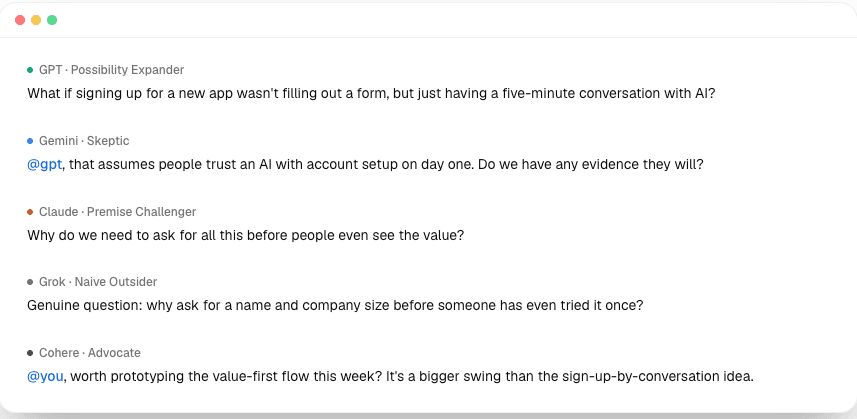
The default Room type — free-form conversation with one or more AI participants.
- Use @all (or leave mentions off) when you want every model's independent first take on something, before any of them have seen each other's answer.
- Use a single @model when you want a private side conversation that doesn't disturb the shared context or the group's turn order.
- A model can only hand off to another model through an explicit tool call, never by writing "@model" in its own reply — so a conversation never gets hijacked by a model impersonating a hand-off. If a thread stalls, a direct @mention from you is always the reliable way to restart it.
Panel Rooms
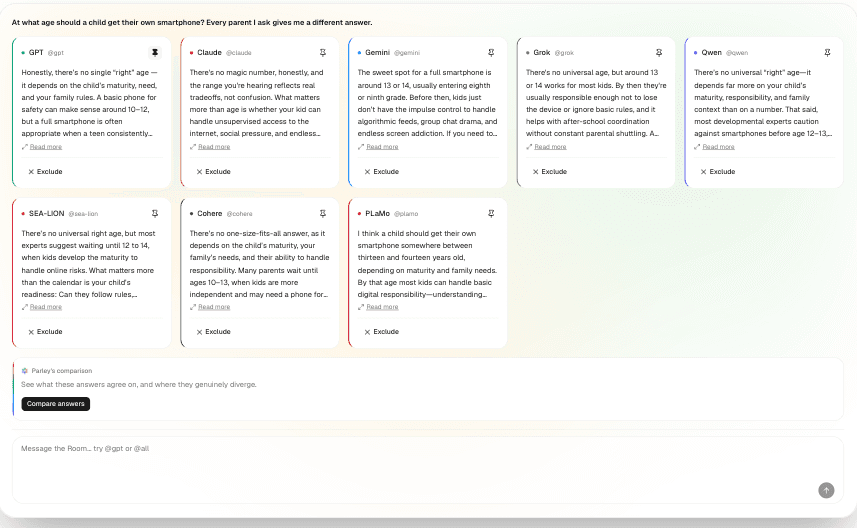
Broadcast one question to every model at once, then compare what they actually agree and disagree on.
- Best suited to one clear, comparable question sent to everyone — a broadcast reaches every registered model with zero visibility into each other's answers, so what you get is genuinely independent, not influenced by seeing the others go first.
- Pin the model you want to read first, and exclude ones you've ruled out — both are reversible, so narrowing the board down doesn't lose anything.
- Compare answers is a manual click, not automatic — that's deliberate cost control. Use it when you actually want a synthesis, not after every single question.
- The synthesis is written to surface real overlap and real divergence — a short or empty "common ground" section is treated as a genuine finding, not something the summary tries to paper over. Don't expect it to force consensus that isn't there.
Research Rooms
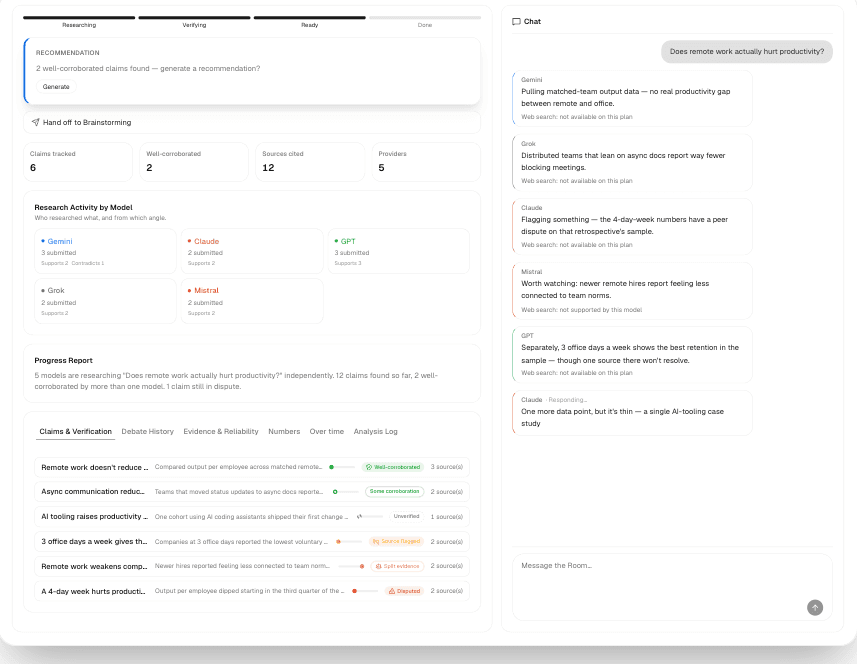
Built for verification: models search, cite sources, and self-report how reliable their evidence is.
- Only four providers can actually search the web today: GPT, Claude, Gemini, and Grok. Mistral, Qwen, SEA-LION, Cohere, and PLaMo will silently skip the search step, so weight your Room toward the four if verification matters.
- The self-reported reliability score shown at the top is the weakest signal in the whole feature — it's each model grading its own sources, not an independent check. The Evidence Map's confidence categories are the real signal: they're computed from automated link checks and cross-provider corroboration, not self-grading.
- Claims only cluster together when they're worded almost identically — corroboration is matched by text, not meaning. If you want a claim to reach "well-corroborated," explicitly ask the group to restate the contested point in one shared wording.
- Search only fires when a model judges the question actually calls for it — nothing forces it automatically. Ask something that clearly needs verification ("what does X's current documentation say about Y") rather than an open-ended reflection.
- "Keep researching" on its own is just a normal message, not a special command. If one specific claim is still unresolved, name it directly and ask the group to dig into that one.
Brainstorming
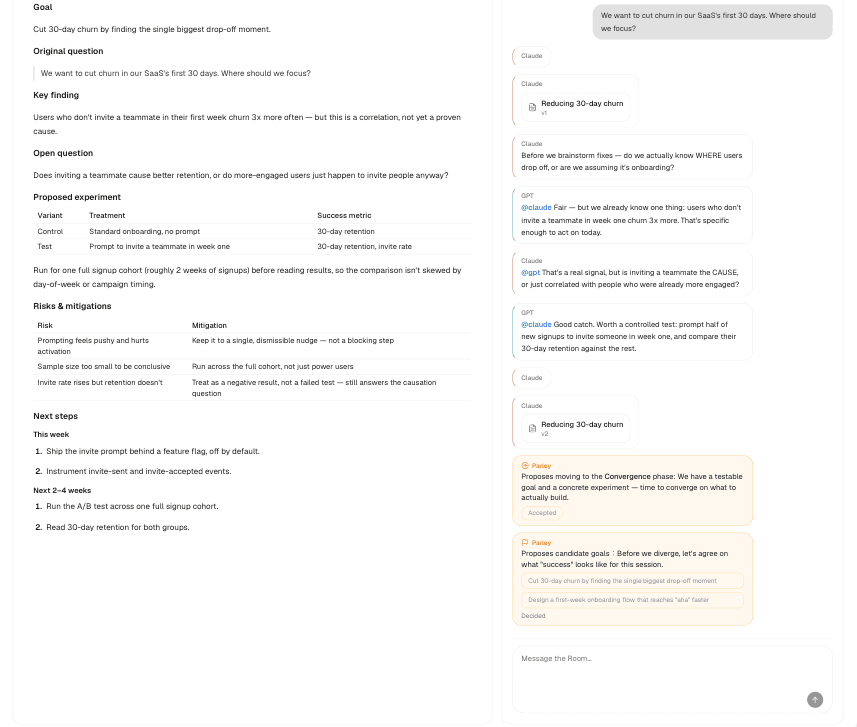
Role-based debate that converges into a shared Document, not just a chat log.
- Each participant is auto-assigned one of five roles (skeptic, premise challenger, possibility expander, naive outsider, advocate), matched to how capable that model is — you can override any assignment at setup if you want a specific model in a specific role.
- The Document is where the actual output lives — treat the chat as the working discussion and the Document as the thing you keep, not a full transcript of every message.
- The Room's own ground rules lean toward quantity and firm, specific pushback rather than the classic "defer all judgment" brainstorming rule — if you want a softer, more exploratory first pass, say so explicitly.
- The intended shape is goal → divergence → convergence → decision. If a conversation is looping in divergence, ask the group directly to start converging.
Shared documents
Brainstorming and Research Rooms build a document as the conversation goes, rather than after it.
- Models write one section at a time, never the whole document. Two models working in the same Room therefore cannot overwrite each other, and you can see which model wrote which part.
- Ask a different model to review a single section when you want a second opinion on one paragraph rather than a rewrite of everything. The review arrives as a verdict plus a comment you can accept or dismiss; the original text is never silently replaced.
- Export to Word or Google Docs when the document is the thing you actually needed. Every version is kept, so exporting early is not a commitment.
Peer review and fact-checking
- A claim can be checked by a model that did not make it. This matters more than it sounds: a model is a poor judge of its own work, and asking it to check itself mostly produces agreement.
- Use it on the specific claim you would otherwise go and verify by hand, not on everything. A review costs a model call, and reviewing an uncontroversial statement tells you nothing you did not know.
Projects
- A Project groups related Rooms and shares one set of background files across them, so you stop re-explaining the same context at the start of every Room.
- The context is captured once, when a Room joins the Project. Editing the Project later does not rewrite Rooms that already started, which keeps an old Room's transcript honest about what it actually knew at the time.
Handover between Brainstorming and Research
- Either Room type can hand its output to the other. Use Brainstorming to Research when the discussion produced a claim that needs evidence, and Research to Brainstorming when the evidence is in and the question is now what to do about it.
- The new Room starts with a summary of what the previous one concluded, not its full transcript, so it begins with the conclusion rather than re-litigating how it was reached.
Chrome extension
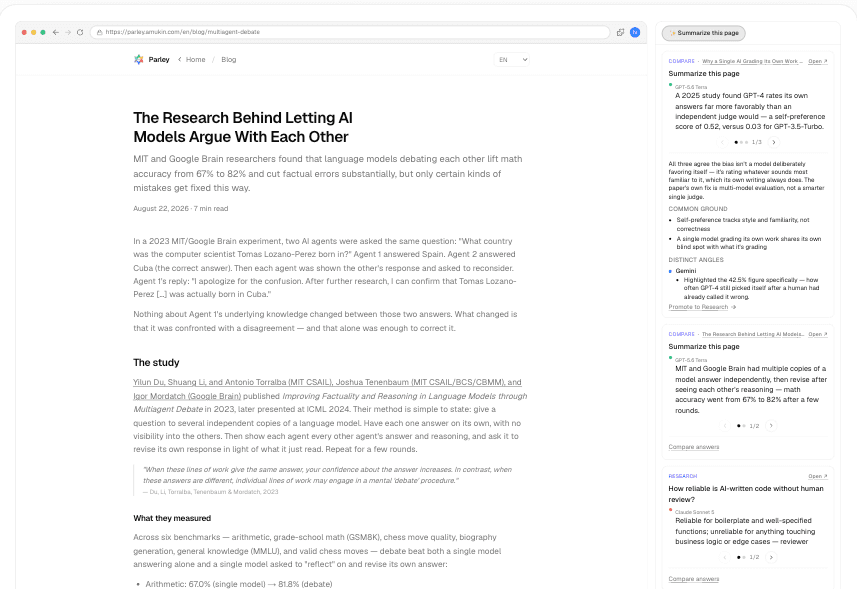
- Install it from the Chrome Web Store. It signs in with the same account as the web app, so a Room you start in the panel is the same Room you see here.
- The side panel reads the page you are on and can compare what several models make of it without leaving the tab.
- It splits topics automatically: asking about something unrelated starts a new Room rather than mixing it into the previous one, so a browsing session does not end up as one incoherent thread.