
Let AI disagree.
Then decide.
One conversation. Multiple participants.
Not "ask GPT, then ask Claude, then compare." Everyone is in the same Room, and can call on each other directly.
Pick your models
Ten providers are available (GPT, Claude, Gemini, Grok, Mistral, Qwen, SEA-LION, Cohere, PLaMo, Solar). On the free and Credit plans, seven of them are included and ready to use with no API key of your own: GPT, Claude, Gemini, Grok, Qwen, Cohere and Solar. The other three (Mistral, SEA-LION and PLaMo) need a key of your own, as does running any provider on your own account.
Open a Room
Every AI model and every person you invite becomes a Participant in the same conversation.
Let everyone talk
You and the AI Participants @mention each other and challenge assumptions. In Auto Mode, they can bring each other in on their own, within a budget you control, and turn to you directly the moment a call is truly yours to make.
Call for a Consensus
Any participant can flag that a summary would help. Agreement, disagreement, and uncertainty come back side by side, never forced into a false majority vote.
Built for genuine disagreement.
A single AI chat tends to just agree with you. Every piece of Parley exists to fix that.
Real disagreement, not agreement theater
A single AI tends to agree with whoever it's talking to. Parley's Participants push back on each other, and on you, when an argument doesn't hold up.
Assign roles, not just prompts
Skeptic, Advocate, Premise Challenger: give each AI a distinct job before a Brainstorming Room starts, so the disagreement is structured instead of random.
A second model checks the claim
Before an answer settles, another Participant can peer-review it and fact-check what it asserted. Disagreement is only useful if someone verifies who was right.
Consensus, not a blended answer
See where the group actually agrees and where it splits, instead of one smoothed-over response that papers over real disagreement.
Deep Research
Participants can search the web and cite their sources when it's genuinely useful, so disagreement is grounded in evidence, not just style.
The conversation becomes a document
Models draft a shared document section by section as you talk, review each other's sections, and you export the result to Word or Google Docs.
See where the models actually agree
Broadcast one question to every model at once. Each answers on its own. Then Parley shows you the real overlap.
Deeper analysis, powered by multiple AI models.
Good data sources are the foundation. What Parley adds is the analysis that comes after: a report that writes itself as the conversation continues, with prose, data, charts, and a table updating turn by turn. It's trustworthy because every model researches independently, then checks and disputes what the others found, live in the dashboard.
Then decide, with everything on the table.
Any Participant can call for a Consensus summary: a structured snapshot of where the Room actually stands, not a forced majority vote.
Agreement
A vertical SaaS approach is the strongest starting point.
Disagreement
Gemini favors market size in India; Claude prioritizes distribution risk.
Uncertainty
Whether the target segment will pay before the product proves lock-in.
Open Questions
What's the minimum viable pricing tier?
Evidence
Two comparable vertical SaaS launches were cited as reference points.
Risks
Long enterprise sales cycles could stall early traction.
Next Steps
Ship a narrow MVP and validate it with ten target customers.
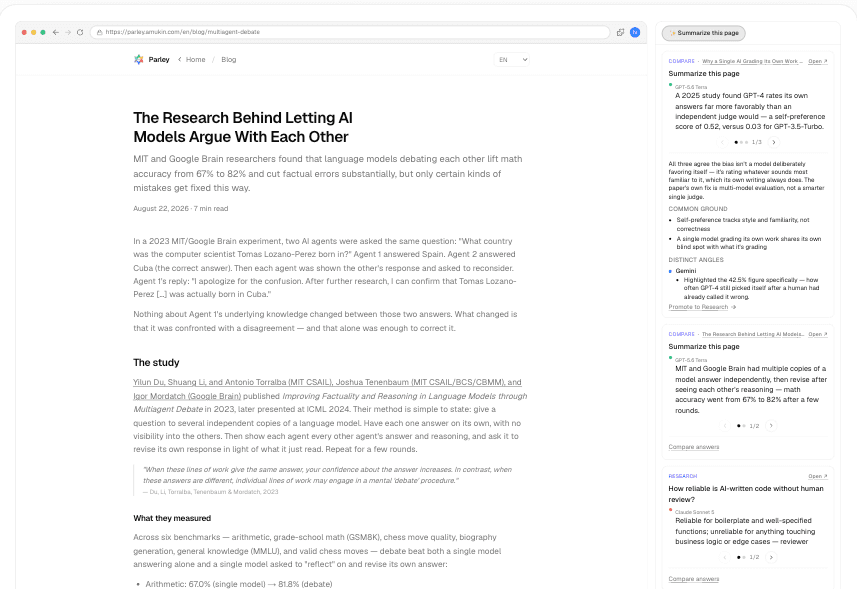
Ask several models about the page you're on.
The Chrome extension puts Parley in a side panel. Ask about the page in front of you and read what each model makes of it, without copying anything into another tab.
- Reads the page you're on, so you don't paste it anywhere.
- Starts a new Room when you change subject, so one browsing session doesn't become one tangled thread.
- Compare answers works here too, on every plan.
Built for people who take their data seriously.
Your keys and your conversations, handled the way you'd want them handled.
Encrypted the moment it arrives
Every API key is envelope-encrypted with Google Cloud KMS before it's ever written to disk.
Never used to train anything
Parley relays your messages to the AI you chose. We don't retain them for training, ours or anyone else's.
Clear about what you pay for
On a Credit plan you pay Parley one predictable amount and we cover the inference. On your own key you pay the provider directly, and Parley never adds a markup on top.
Try it free. Pay for what you actually use.
Start free. Starter and up unlock everything — Auto Mode, Research, Brainstorming — the only difference is how much Credit you get. Bring your own API key for BYOK's fully unlimited access.
Sign up and watch multiple AIs actually push back on each other.
- One-time trial Credit (~40 messages)
- Up to 3 AI Participants per Room
- GPT, Claude, Gemini, Grok, Qwen, Cohere and Solar included, no API key needed
- Human-guided Mode
- Try Research and Brainstorming too
Enough for casual, everyday use.
- ~58 messages/day of Credit
- Flagship-model allowance (~2/mo)
- Up to 6 AI Participants per Room
For daily brainstorming.
- ~149 messages/day of Credit (2.5x Starter)
- Flagship-model allowance (~12/mo)
For making flagship models your default.
- ~240 messages/day of Credit
- Flagship-model allowance (~70/mo)
Your own API key, no ceiling.
- No usage cap
- Unlimited access to every model
- Everything in Standard/Pro
Use your own key, if you'd rather.
You don't need an API key to start: the free and Credit plans include GPT, Claude, Gemini, Grok, Qwen, Cohere and Solar. Add your own key to reach Mistral, SEA-LION and PLaMo, or to run any provider on your own account and pay that provider directly. Parley never marks up inference on your own key. Takes about a minute per model.
- 1Sign in at platform.openai.com
- 2Open API keys and create a new secret key
- 3Paste it into Parley when adding an OpenAI Endpoint
- 1Sign in at console.anthropic.com
- 2Open Settings → API Keys and create a new key
- 3Paste it into Parley when adding an Anthropic Endpoint
- 1Sign in at aistudio.google.com with your Google account
- 2Click "Get API key" and create a new key
- 3Paste it into Parley when adding a Google Endpoint
- 1Sign in at console.x.ai
- 2Open API Keys and create a new key
- 3Paste it into Parley when adding an xAI Endpoint
- 1Sign in at console.mistral.ai
- 2Open API Keys and create a new key
- 3Paste it into Parley when adding a Mistral Endpoint
- 1Sign in at bailian.console.alibabacloud.com (international region)
- 2Open API Keys and create a new key
- 3Paste it into Parley when adding a Qwen Endpoint
- 1Sign in at the SEA-LION Playground
- 2Create a new trial API key
- 3Paste it into Parley when adding a SEA-LION Endpoint
- 1Sign in at dashboard.cohere.com
- 2Open API Keys and create a new key
- 3Paste it into Parley when adding a Cohere Endpoint
- 1Sign in at plamo.preferredai.jp
- 2Open the API console and create a new key
- 3Paste it into Parley when adding a PLaMo Endpoint
- 1Sign in at console.upstage.ai
- 2Open API Keys and create a new key
- 3Paste it into Parley when adding an Upstage Endpoint
Every key is envelope-encrypted with Google Cloud KMS the moment it reaches us. Not even Parley's own staff can read it back out. See how in our Privacy Policy
Why "Parley"
A parley is a conversation held between opposing sides to settle a dispute: not a vote, not a single ruling, but a negotiated understanding reached by talking it through. That is exactly what happens when GPT, Claude, Gemini, and Grok are placed in the same Room: they hold different positions, and the goal isn't to force them into agreement, but to let the discussion itself surface what's actually true, uncertain, or still contested.
Open a Room. Let them disagree.
Free to start, no credit card, ready in about a minute.